
WhatsApp Booking Software for Salons: A Practical Guide
ChatSync SolutionsOctober 23, 20267 min read
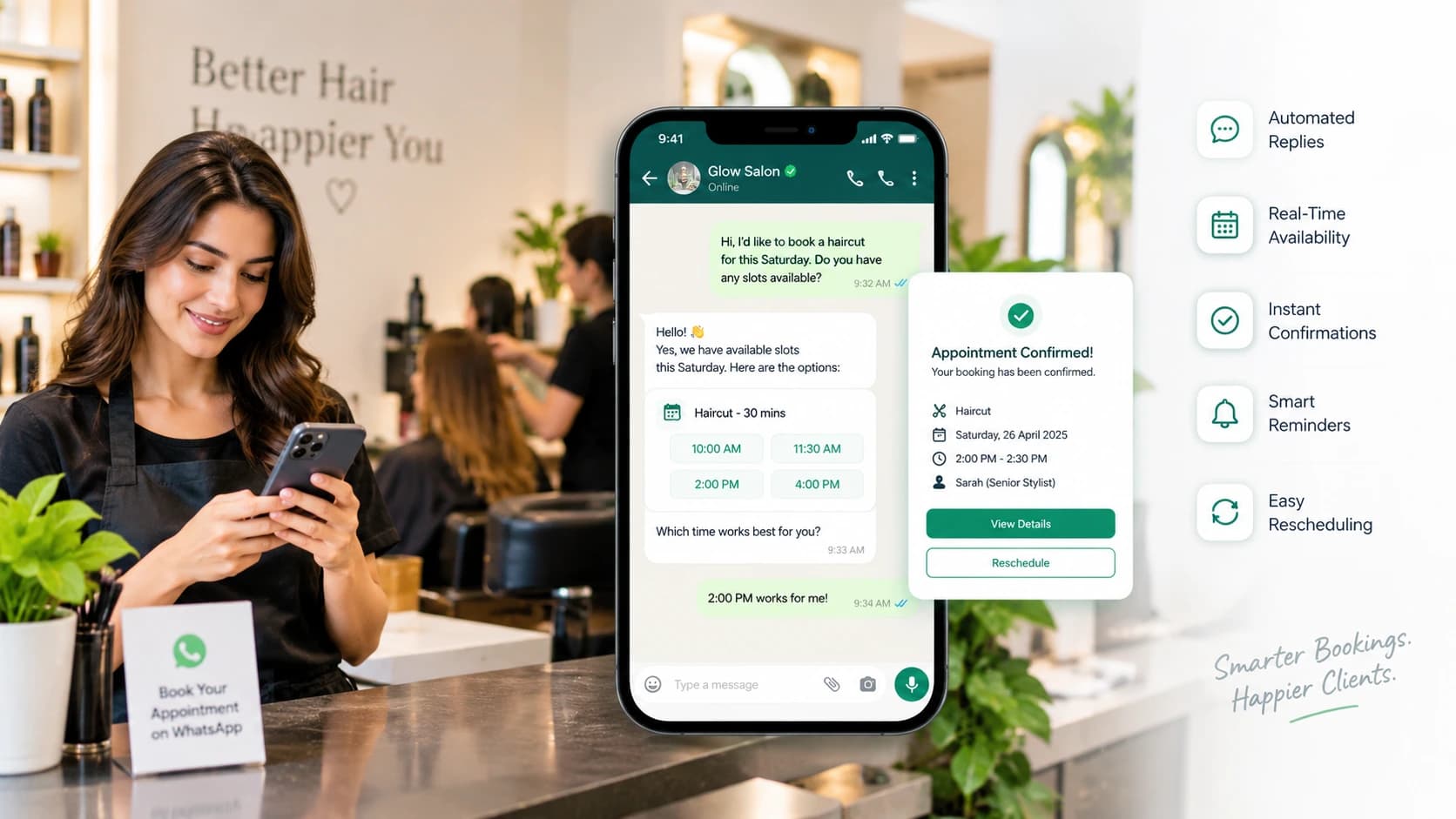
WhatsApp booking software helps salons manage appointment requests, confirmations, reminders, and rescheduling.
WhatsApp Booking Software for Salons: A Practical Guide
A salon can lose a booking without ever speaking to a customer. Someone sends a WhatsApp message asking about hair coloring, bridal makeup, or a free appointment slot. The stylist is busy, the receptionist is serving another client, and the reply comes too late.
WhatsApp booking software for salons helps businesses manage these requests through a more organized booking process. Depending on the platform, it can answer service questions, check appointment availability, confirm bookings, send reminders, and help customers reschedule without requiring staff to handle every message manually.
The right system should fit the way your salon operates, not force your team to change every existing process.
What Is WhatsApp Booking Software for Salons?
WhatsApp booking software connects customer conversations with appointment scheduling and business workflows. Instead of using WhatsApp only to answer messages, a salon can use it as a channel for handling booking requests and communicating appointment details.
For example, a customer might message, “Can I book a haircut with Sarah on Saturday afternoon?” The system can collect the service and preferred time, check the available schedule if supported, and guide the customer through the booking process.
Basic tools may send automatic replies or booking links. More advanced platforms use AI agents, calendar integrations, and staff handover to manage a larger part of the conversation.
The distinction matters: an automatic reply does not necessarily mean an appointment has been booked. A reliable booking workflow must confirm the actual availability and record the appointment correctly.
How Does WhatsApp Appointment Booking Work?
A typical salon booking workflow follows five steps.
The customer sends a message. They ask about a service, price, stylist, or available appointment.
The system identifies the request. Automation or an AI agent gathers the information needed to proceed.
Available appointments are checked. Where calendar integration is supported, the system checks the relevant staff member's schedule before offering a time.
The appointment is confirmed. The customer receives the agreed service, date, time, and other relevant details.
Reminders and follow-ups are sent. Depending on the configuration, the system can remind customers before their appointment and help them reschedule when necessary.
Consider a salon that offers haircuts, balayage, facials, and bridal makeup. These services have different durations and may require different staff members. The booking system needs to account for those differences instead of treating every appointment as an identical time slot.
Features to Look for in Salon Booking Software
1. Service-based appointment scheduling
Your system should accommodate different services, appointment durations, and staff availability. A haircut might take 30 minutes, while a colour treatment could require several hours.
Check whether the software can prevent overlapping bookings and handle the scheduling rules your salon actually uses.
2. Automated replies to common questions
Customers frequently ask about prices, opening hours, available services, location, and cancellation policies. An automated assistant can answer routine questions using information supplied and approved by the business.
Staff should still be able to correct inaccurate information and handle requests that need personal judgment.
3. Appointment confirmations and reminders
A confirmation gives customers a record of their booking. Reminders provide another opportunity to attend, cancel, or request a different time.
For instance, a salon might send a reminder 24 hours before an appointment and another one hour beforehand. The timing should suit its customers and operational needs. Reminders can help reduce avoidable no-shows, but they cannot eliminate them.
4. Staff selection and shared inbox
Some customers prefer a particular stylist. Others want the earliest available appointment. Software should make those preferences easier to manage.
A shared inbox is also useful when several receptionists or managers handle the same business number. Staff can review conversations, assign requests, and take over when automation cannot resolve an issue.
5. Rescheduling and cancellation management
Customers' plans change. A good workflow should explain how to cancel or reschedule, check the new time against actual availability, and update the original booking.
If a system only sends a message but leaves the calendar unchanged, staff may still need to correct the appointment manually.
6. Integrations, reporting, and privacy
Consider whether the software works with your existing calendar, CRM, payment process, or salon management system. Check what reports it provides, how staff access customer information, how data is retained, and what the provider's privacy and security documentation actually covers.
For marketing messages, follow the applicable WhatsApp policies and consent requirements. Appointment communication and promotional campaigns should not be treated as interchangeable.
WhatsApp Booking Software vs. a Traditional Online Booking System
Both options can help salons manage appointments, but they serve customers differently.
Capability | WhatsApp booking | Traditional online booking |
|---|---|---|
Customer interaction | Conversation-based | Booking page or form |
Service questions | Can be answered in chat | Often require separate contact |
Appointment selection | Through chat or a booking link | Through a calendar interface |
Automated reminders | Available when supported | Depends on the software |
Human assistance | Can continue in the same conversation | May require a separate channel |
Best fit | Customers who prefer messaging | Customers who prefer self-service scheduling |
Many salons benefit from offering both. A booking page gives customers a direct self-service option, while WhatsApp helps those who have questions or need assistance choosing a service.
Is AI-Powered WhatsApp Booking Worth It for a Salon?
It depends on the number of inquiries your salon receives and how much staff time goes into managing them.
A solo stylist with a few daily appointments may need only a simple calendar and automatic replies. A busy salon with several stylists, frequent after-hours inquiries, and bridal packages may benefit more from automated booking workflows and a shared team inbox.
Before choosing a platform, measure your current response times, missed inquiries, booking completion rate, and no-show rate. Then compare those figures after implementation.
Also test how the system handles unavailable appointments, unclear requests, last-minute changes, and conversations that need human attention. These situations often reveal more than a polished product demonstration.
How ChatSync Solutions Helps Salons Manage WhatsApp Bookings
ChatSync Solutions offers a salon-focused WhatsApp automation workflow designed to help businesses manage appointment requests and customer conversations.
Its Salon & Beauty solution describes service-based booking, stylist selection, bridal booking flows, appointment reminders, follow-ups, and promotional campaigns. The platform also describes an official Meta Cloud API connection and human involvement when a conversation needs personal attention.
The best way to assess whether it fits your salon is to test a realistic booking request, verify how staff availability is checked, and confirm which integrations and workflows your proposed setup includes.
If you are comparing solutions, book a free demo with ChatSync Solutions to discuss your salon's requirements.
Frequently Asked Questions
Can customers book salon appointments directly through WhatsApp?
Yes, when the business uses a booking workflow that supports appointment selection and confirmation through WhatsApp. Some tools instead direct customers to an external booking page.
Can WhatsApp booking software manage multiple stylists?
Some platforms support stylist selection, staff-specific schedules, and appointment assignment. Confirm that the system can handle your team's availability and service durations.
Does WhatsApp booking software send appointment reminders automatically?
Many platforms support automated reminders, but the available timing, message types, and configuration vary. Check the provider's features and applicable WhatsApp messaging rules.
Is WhatsApp booking software suitable for a small salon?
It can be, particularly when the salon receives enough messages that manual scheduling becomes time-consuming. A smaller business may prefer a simpler solution over a complex automation platform.
Can a salon use WhatsApp booking alongside an online booking page?
Yes. The two channels can complement each other. Depending on the software, they may share a calendar or require integration to keep appointment availability consistent.
How should a salon choose the right booking software?
Start with the salon's booking volume, number of staff, scheduling requirements, customer communication preferences, integrations, privacy needs, and total cost. Test real booking scenarios before committing.
Can I see WhatsApp booking software in a live demo before choosing it?
Yes, a live Demo can help you understand how the software works and whether its booking workflows suit your salon. You can review relevant features, ask questions about your requirements, and clarify which integrations and automation options are available before making a decision.
Final recommendation: Choose software that accurately manages availability, confirms appointments, handles changes, and allows staff to intervene when needed. Automation is valuable when it makes booking easier for both customers and the salon team.
#WhatsApp Booking#Salon Software#Appointment Scheduling#WhatsApp Automation#AI Booking#Salon Management