WhatsApp Automation for Dental Clinics: A Practical Guide
ChatSync SolutionsOctober 23, 20266 min read
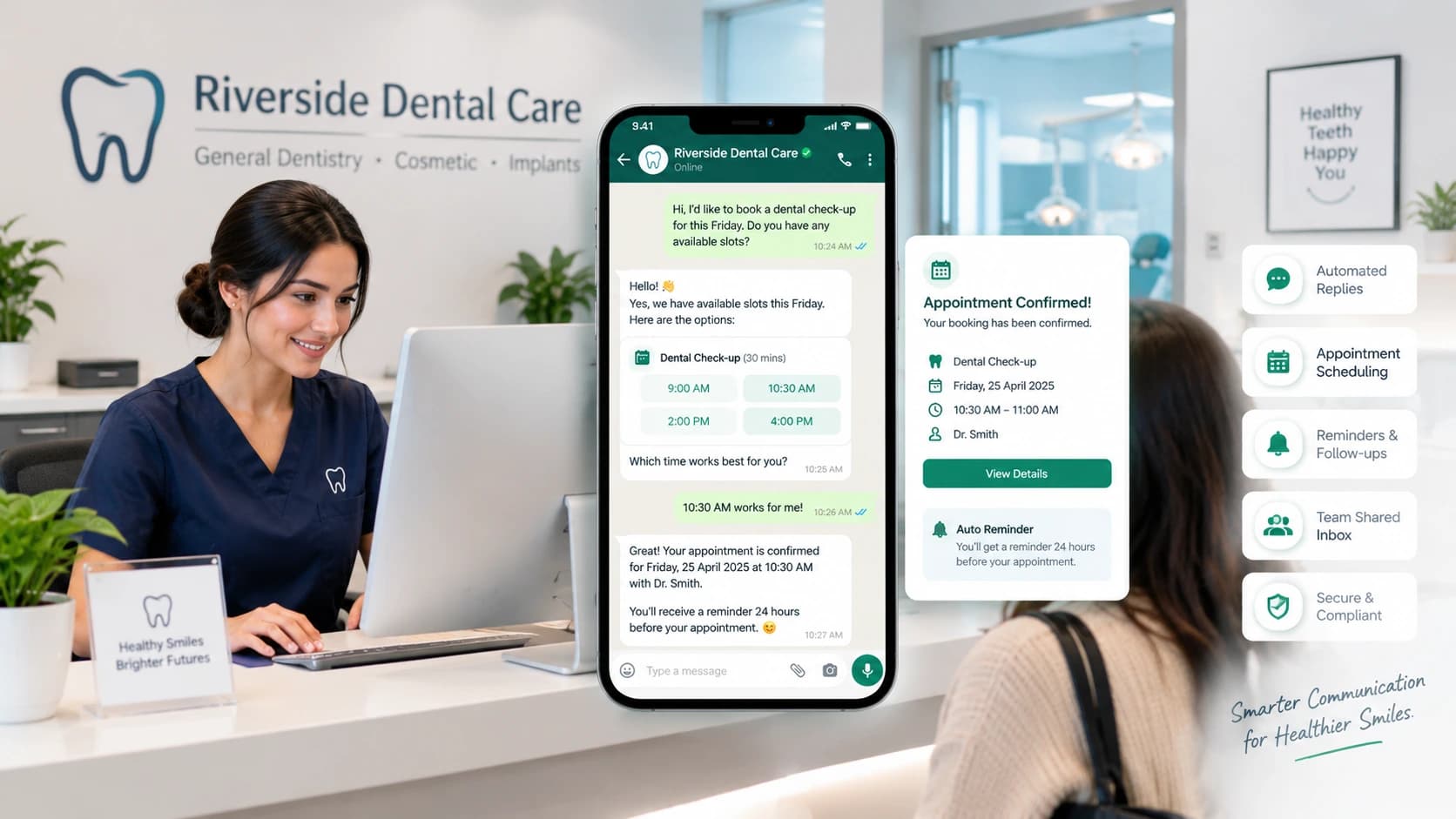
WhatsApp automation helps dental clinics manage patient enquiries, appointment reminders, and booking requests.
WhatsApp Automation for Dental Clinics: A Practical Guide
Dental clinics handle more than appointments. Reception teams answer questions about opening hours, check-up fees, available dentists, cancellations, and treatment enquiries while helping patients who are already at the clinic. When several requests arrive at once, some messages get delayed or missed.
WhatsApp automation for dental clinics helps organize these conversations. Depending on the software, it can answer routine questions, collect booking requests, confirm available appointments, send reminders, and route conversations to reception staff. The aim is to make administrative communication easier without replacing the people responsible for patient care.
What Is WhatsApp Automation for Dental Clinics?
WhatsApp automation uses software to handle selected patient communication tasks through WhatsApp. A basic setup might send an acknowledgement or appointment reminder. A more advanced system can connect conversations with scheduling workflows, collect booking details, and help patients request a different appointment time.
For example, someone might message a clinic on Sunday evening to ask about a dental check-up. An automated assistant could explain the clinic's opening hours, collect the preferred day, and guide the person through the booking process if appointment availability is connected.
The distinction matters: an automated reply is not the same as a confirmed appointment. The system needs access to accurate scheduling information and a clear process for confirming the booking.
How Can Dental Clinics Use WhatsApp Automation?
1. Respond to routine patient enquiries
Clinics receive recurring questions about location, opening hours, accepted services, consultation fees, and how to book an appointment. An assistant can answer these questions using information approved by the clinic.
Answers should stay within the clinic's documented information. Questions about diagnosis, treatment choices, or symptoms need appropriate clinical review rather than an automated guess.
2. Manage appointment requests and confirmations
A connected booking workflow can collect the patient's preferred appointment type, dentist, and time. If the system has access to the clinic's actual schedule, it can offer available slots and confirm the selected booking.
This is particularly useful when a practice has several dentists, hygienists, treatment types, or appointment durations. The scheduling rules should reflect the clinic's real availability instead of offering the same time slots to everyone.
3. Send appointment reminders
Patients can forget visits booked weeks in advance. Automated reminders allow them to confirm, cancel, or request a change before the appointment.
A useful reminder should include only the details needed for the patient to identify the appointment. Clinics should also check messaging permissions, applicable WhatsApp rules, and local privacy requirements before sending automated messages.
4. Handle cancellations and rescheduling
When a patient cannot attend, a structured WhatsApp workflow can collect the change request and guide them toward another available time. Staff can then review the request if the system cannot update the schedule automatically.
The important part is keeping the calendar accurate. A message that acknowledges a cancellation without updating or flagging the appointment can still leave reception with extra work.
5. Follow up with new enquiries and overdue check-ups
Some people enquire about a consultation but do not book immediately. Others may be due for a routine check-up or cleaning appointment.
With suitable consent and clinic-approved workflows, WhatsApp can support relevant follow-ups and recall reminders. Messages should be helpful rather than persistent, and patients' communication preferences must be respected.
What Should Dental Clinics Look for in WhatsApp Automation Software?
Not every tool offers the same capabilities. Before choosing a platform, check the following:
Feature | What to verify |
|---|---|
Appointment scheduling | Can it use the clinic's real availability and appointment rules? |
Automated reminders | Can patients confirm or request changes? |
Shared team inbox | Can reception staff assign, review, and manage conversations together? |
Human handover | Can a staff member take over when a request needs personal attention? |
Integrations | Does it connect with the clinic's existing calendar or practice software? |
Reporting | Can the clinic measure enquiries, confirmed bookings, cancellations, and response times? |
Privacy and access | Are permissions, data retention, and security practices clearly documented? |
Run a few realistic tests before committing. Try booking two appointments close together, changing a booking, asking an unanswered question, and sending a message that requires staff attention. These scenarios can reveal problems that a standard product demonstration may not show.
Patient Privacy and Clinical Oversight
Dental appointment messages can reveal personal information about a patient's health. Clinics should therefore assess how a platform collects, stores, accesses, and shares information before introducing automation.
Requirements differ by country. For example, health information receives additional protection under UK GDPR, while US practices must assess their obligations under applicable healthcare privacy rules. Using a messaging tool does not, by itself, make a clinic compliant.
Automation should also remain within an administrative role. It can collect an enquiry, acknowledge a message, or alert staff to a potentially urgent request. It should not diagnose dental conditions or replace a qualified professional's judgment. Define an escalation process for pain, swelling, injuries, and other urgent messages, including when the clinic is closed.
How ChatSync Solutions Supports Dental Clinics
ChatSync Solutions offers an AI receptionist workflow for dental practices through its dental clinic solution. The official page describes automated patient enquiries, appointment booking, scheduling, reminders, rescheduling, shared team inbox functionality, and staff handover.
Clinics considering the platform should confirm which integrations, scheduling rules, and privacy controls are available for their particular setup. The best configuration depends on the practice's appointment volume, team structure, existing systems, and local requirements.
For a broader explanation of the process, read how WhatsApp appointment booking helps dental clinics.
If you are evaluating options, you can request a free demo from ChatSync Solutions to discuss your clinic's workflow and requirements.
Frequently Asked Questions
Can WhatsApp automate dental appointment bookings?
Yes. A suitable system can collect booking details and help patients select an appointment. Direct confirmation depends on whether the software is connected to accurate scheduling availability and configured to confirm bookings.
Can dental clinics send appointment reminders through WhatsApp?
Some platforms support automated reminders. Clinics should verify the available features, messaging rules, consent requirements, and local privacy obligations before using them.
Can a WhatsApp chatbot answer dental questions?
It can answer routine administrative questions using clinic-approved information. Questions requiring diagnosis, treatment recommendations, or professional assessment should be referred to qualified dental staff.
Is WhatsApp automation suitable for a small dental clinic?
It may be useful when staff spend significant time answering repeated enquiries, managing appointment changes, or following up with patients. A smaller practice may need only a few well-designed workflows rather than a complex system.
What should a clinic check before choosing a platform?
Check scheduling accuracy, reminders, rescheduling, staff handover, integrations, reporting, privacy safeguards, costs, and support. Test realistic patient scenarios before rolling the system out.
Final Thoughts
WhatsApp automation can help dental clinics manage routine communication and appointment administration more consistently. The most useful setup connects messages to the actual booking process, protects patient information, and gives people a clear route to a member of staff.
Start by identifying where your clinic loses time today: unanswered enquiries, manual reminders, appointment changes, or overdue follow-ups. Automate the tasks that are repetitive and predictable, then measure whether the new workflow makes booking easier for patients and reception staff.
#WhatsApp Automation#Dental Clinics#Appointment Scheduling#Patient Communication#AI Receptionist#Healthcare Automation